
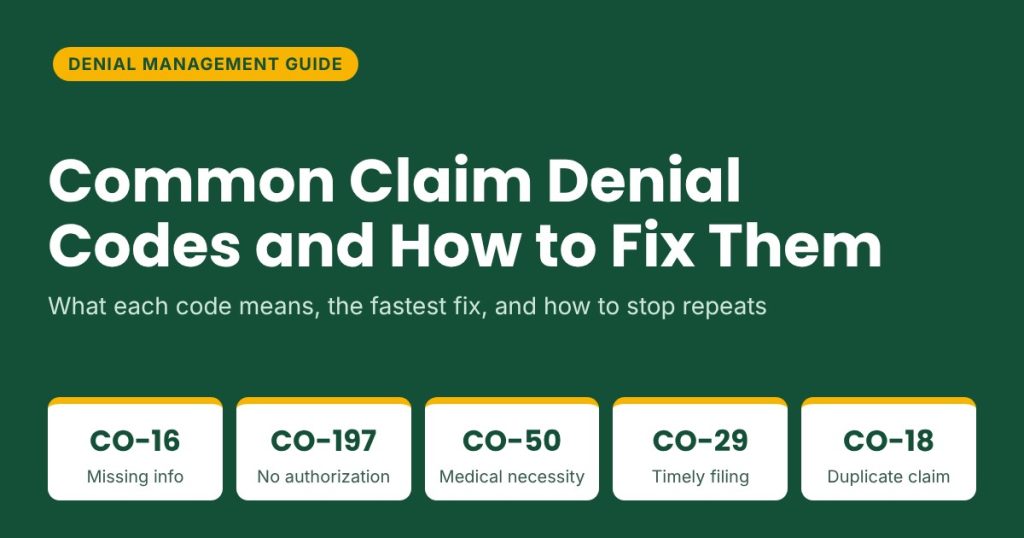
Common claim denial codes tell you why a payer refused to pay a claim, and each one points to a specific fix. The five that cost most practices the most revenue are CO-16 (missing or invalid information), CO-197 (no authorization), CO-50 (medical necessity), CO-29 (timely filing) and CO-18 (duplicate claim). This guide explains what each code means, how to fix it, and how to stop it from coming back.
Key Takeaways
- A denial code has up to three parts: a group code (who is responsible), a CARC (why) and an optional RARC (extra detail). Read all three before acting.
- CO-16 and CO-18 are usually quick to resolve. CO-197 and CO-50 usually need documentation and an appeal. CO-29 is the hardest to reverse without proof.
- Most of these denials start before the claim is sent, in eligibility checks, authorization, coding and data entry.
- Log every denial by code, payer and root cause as part of a structured denial management process so patterns become visible.
How to Read a Denial Code: Group Code, CARC and RARC
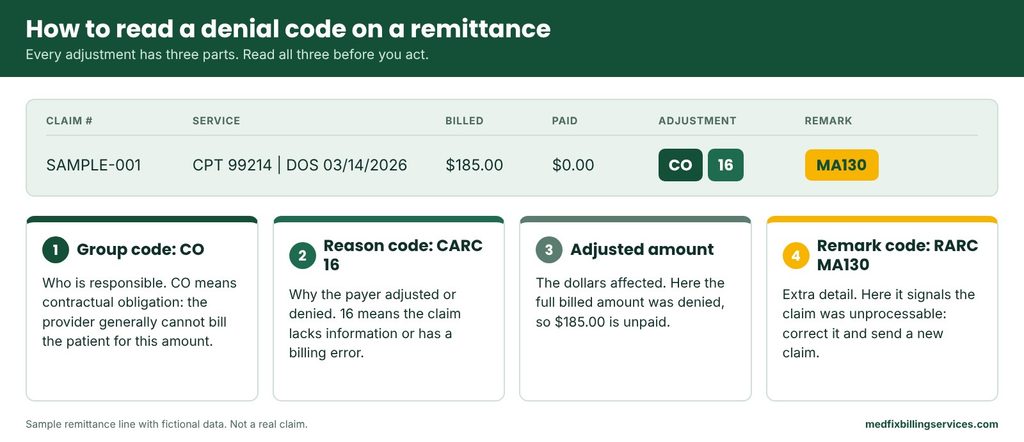
When a payer finishes processing a claim, it sends a remittance advice, usually as an electronic ERA, that lists every payment and adjustment. Each adjustment is described in up to three parts:
- Group code. Shows who is financially responsible. CO (contractual obligation) generally means the provider absorbs the amount and cannot bill the patient. PR (patient responsibility) means the patient may owe it. OA (other adjustment), PI (payer initiated reduction) and CR (correction or reversal) cover the remaining cases.
- CARC (claim adjustment reason code). The number that explains why the amount was adjusted or denied, such as 16 or 197.
- RARC (remittance advice remark code). An optional code that adds detail, such as MA130, which tells you the claim was unprocessable.
So “CO-16” simply means group code CO plus reason code 16. The sample below uses fictional data to show how the pieces sit on one remit line.
Quick Reference: The 5 Most Costly Denial Codes
Use this table to triage a denial in seconds, then read the section for that code.
| Code | What the payer is saying | Usual cause | First action | Fixed by resubmission? |
| CO-16 | Claim lacks information or has a billing error | Wrong ID, NPI or date of service; missing field | Correct the data in your system and send the claim again | Usually yes |
| CO-197 | Authorization or precertification absent | Authorization not obtained, expired or not linked to the claim | Check for an authorization on file; appeal with proof if one existed | Sometimes; often needs appeal |
| CO-50 | Service not deemed medically necessary | Diagnosis does not support the procedure; thin documentation | Review diagnosis and notes; appeal with clinical records | Rarely; usually appeal |
| CO-29 | Time limit for filing has expired | Late submission or late correction | Pull proof of timely filing and appeal if you have it | Only with proof |
| CO-18 | Exact duplicate claim or service | Resubmitting a claim that is still in process | Check claim status first; do not resubmit | Usually not needed |
Payer rules differ. Always confirm exact steps and deadlines in the payer’s provider manual.
CO-16: Claim Lacks Information or Has a Billing Error
What it means
The payer could not process the claim because something required is missing, invalid or inconsistent. A RARC such as MA130 often points to the problem. Many CO-16 denials are not appealable because the claim was treated as unprocessable, so the fix is to correct it and send it again.
Why it happens
- Patient ID, date of birth or insurance details that do not match the payer’s records
- Missing or invalid NPI, taxonomy or referring provider
- Incorrect date of service, place of service or diagnosis pointer
How to fix it
- Read the RARC and remit note to find the exact field in question.
- Correct the data in your practice management system, not just on the claim form.
- Resubmit the way the payer instructs. Some want a new claim, others a corrected claim with frequency code 7.
How to prevent it
- Turn on claim scrubber edits for required fields and payer-specific rules.
- Verify demographics and the insurance card at every check-in.
Full guide: [LINK: CO-16 denial code | /co-16-denial-code/]. Clean claims start with solid medical billing workflows.
CO-197: Authorization or Precertification Absent
What it means
The payer says a required prior authorization, precertification or notification was missing for the service. It is one of the most expensive denials because the service has usually already been performed.
Why it happens
- Authorization was never requested, or was requested after the service
- Authorization exists but does not match the CPT code, units, date, facility or rendering provider
- Authorization expired, or the number was not entered on the claim
How to fix it
- Check whether an authorization exists and whether its details match the claim exactly.
- If it was approved but missing from the claim, correct the claim and resubmit with the authorization number.
- If none was obtained, ask the payer whether retroactive authorization is accepted and within what window. Many payers do not allow it.
- Appeal with proof of approval, clinical documentation or a documented payer error.
How to prevent it
- Verify authorization requirements by payer and CPT code at scheduling.
- Track authorization numbers, approved units and expiry dates in one place, and recheck when the schedule changes.
CO-50: Not Deemed Medically Necessary
What it means
The payer decided the service does not meet its medical necessity criteria for the diagnosis reported. The decision is based on the payer’s coverage policy, which for Medicare means the applicable national or local coverage determination.
Why it happens
- Diagnosis codes do not meet the payer’s coverage criteria for the procedure
- Documentation does not show why the service was needed
- Frequency or age limits exceeded, or diagnosis codes less specific than the record supports
How to fix it
- Compare the diagnosis and procedure codes against the payer’s medical policy.
- Confirm coding matches the documentation. If it does not, correct the claim.
- If coding is right, appeal with clinical notes, test results and a letter of medical necessity from the provider.
How to prevent it
- Check coverage policies before scheduling costly or frequently repeated services.
- Document medical necessity at the visit and use the most specific diagnosis the record supports. Our medical coding team builds this review into every claim.
For Medicare, a valid signed ABN before the service affects whether the patient can be billed, so check the group code on the remit.
CO-29: Timely Filing Limit Expired
What it means
The payer received the claim after its filing deadline. Timely filing denials are the hardest to overturn because the payer owes nothing unless you can prove the claim was filed on time.
Why it happens
- Charges held up by late coding, missing documentation or provider sign-off
- Claims rejected at the clearinghouse or payer and never reworked
- Wrong payer billed first, or insurance information updated late
How to fix it
- Confirm the payer’s actual limit and when the clock starts. For secondary claims it often starts from the primary payer’s decision.
- Collect proof of timely filing, such as a clearinghouse acceptance report, a payer acknowledgment, an earlier rejection or denial, or a mailing receipt.
- Appeal with that proof. Some payers treat a true late-filing denial as final, so the strongest case is evidence the claim was filed on time. Without proof, follow your write-off policy, since the patient generally cannot be billed for a CO denial.
How to prevent it
- Submit claims within days of the visit and review unbilled charges weekly.
- Work clearinghouse and payer rejection reports every day, and store each payer’s limit in your system.
Medicare generally requires claims to be filed within one calendar year (12 months) from the date of service, while commercial payers set their own limits, often shorter, in the contract and provider manual.
See [LINK: timely filing limits by insurance company | /timely-filing-limits-by-insurance-company/] and [LINK: CO-29 denial code | /co-29-denial-code/].
CO-18: Exact Duplicate Claim or Service
What it means
The payer believes this exact claim or service was already submitted or paid. In most cases the right move is to find the original claim, not to send another one.
Why it happens
- Resubmitting a claim that is still pending
- Sending a corrected claim without the right frequency code or original claim number
- The same service entered twice, or a legitimate repeat service billed without the needed modifier
How to fix it
- Look up claim status in the payer portal or by electronic status inquiry and find the original claim.
- If the original paid or is still in process, do nothing and do not resubmit.
- If the original was denied and you are correcting it, send a corrected claim with the payer’s required frequency code and original claim number.
- If two separate services were truly performed, add the proper modifier and documentation.
How to prevent it
- Check claim status before any resubmission and set a waiting period per payer.
- Switch off automatic resubmission rules that resend claims still in process.
Full guide: [LINK: CO-18 denial code | /co-18-denial-code/].
How to Work Any Denial: A 6-Step Workflow
- Read the whole remit line: group code, CARC, RARC, amount and claim number.
- Decide if it is soft or hard. Soft denials (missing information, duplicates, setup errors) can usually be fixed and resent. Hard denials (medical necessity, timely filing) need an appeal or a write-off decision.
- Choose the route: correct and resubmit, request reconsideration, or file a formal appeal.
- Gather evidence: documentation, authorization numbers, proof of timely filing and a copy of the corrected claim.
- Act inside the payer’s deadline and put that date on the work queue the day the denial arrives.
- Log the denial with its root cause so the same error is not repeated.
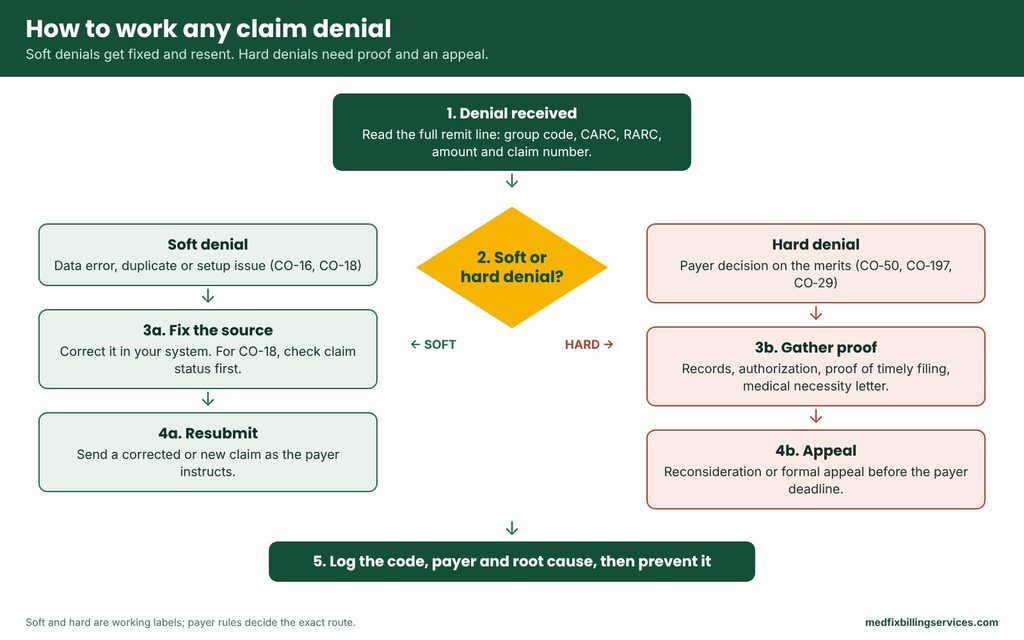
In short: read the remit line, decide soft or hard, resubmit or appeal, then log the root cause.
For the full process, see [LINK: denial management process step by step | /denial-management-process-step-by-step/] and [LINK: how to appeal a denied insurance claim | /how-to-appeal-a-denied-insurance-claim/].
Corrected Claim, Reconsideration or Appeal: Which One to Use?
| Route | Use it when | Typical evidence | Notes |
| Corrected or new claim | The error was on your side, such as CO-16 or a fixable duplicate | Corrected claim with the right frequency code | Fastest route; follow payer rules |
| Reconsideration | You believe the payer made a processing mistake or you have extra information | Short written request with supporting documents | Informal first review; not every payer offers it |
| Formal appeal | You disagree with the decision, such as CO-50, or CO-197 and CO-29 with proof | Appeal letter, medical records, authorization or filing proof | Strict deadlines; Medicare redetermination must be requested within 120 days of receiving the initial determination |
Other Denial Codes You Will See Often
These codes appear on most “top denials” lists. Each one has a different fix, so read the description before reworking the claim.
| Code | What it generally means | Quick note |
| CO-4 | Procedure code is inconsistent with the modifier, or a required modifier is missing | Check modifiers against payer rules |
| CO-11 | Diagnosis is inconsistent with the procedure | Review diagnosis pointers and coding |
| CO-22 | Care may be covered by another payer per coordination of benefits | Verify primary and secondary coverage |
| CO-45 | Charge exceeds the fee schedule or maximum allowable amount | Usually an expected contractual write-off, not an error |
| CO-97 | Payment is included in another service already adjudicated | Often bundling; check NCCI edits and modifiers |
| CO-109 | Claim is not covered by this payer and belongs to another | Verify the correct payer and bill there |
We cover each in its own guide, starting with [LINK: CO-4 denial code | /co-4-denial-code/], [LINK: CO-97 denial code | /co-97-denial-code/] and [LINK: CO-45 denial code | /co-45-denial-code/].
Prevent Denials Before the Claim Is Sent
Most avoidable denials trace back to the front end of the revenue cycle. The five checkpoints below each stop a specific code.
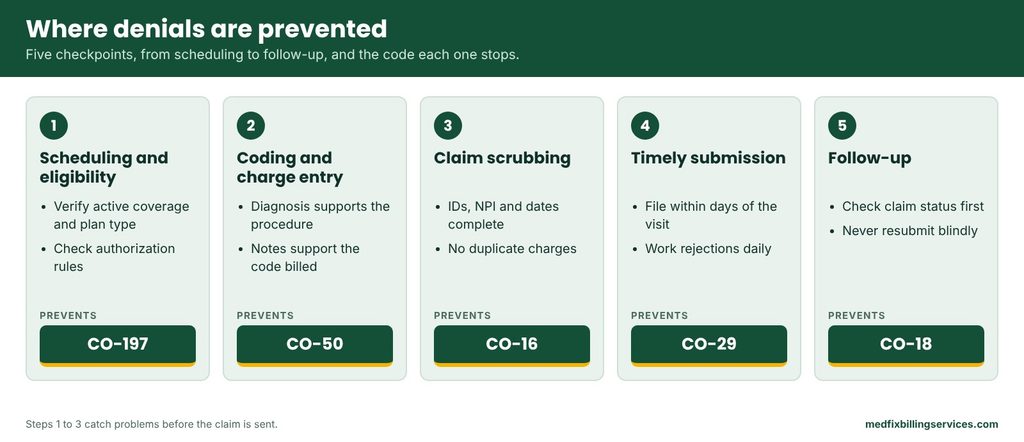
- Scheduling and eligibility. Verify active coverage, plan type and coordination of benefits, and check authorization rules for every visit, ideally before the appointment.
- Coding and charge entry. Make sure the diagnosis supports the procedure, modifiers are correct and the notes support what is billed.
- Claim scrubbing. Use payer-specific edits to catch missing fields, invalid IDs and duplicates before submission.
- Timely submission. File within days of the visit and work rejections daily so nothing ages past the deadline.
- Follow-up. Check claim status at set intervals and never resubmit blindly. Disciplined A/R follow-up keeps denied claims from aging.
Track Denial Patterns Every Month
Fixing one claim at a time does not stop repeat denials. A simple log shows which codes, payers and workflows are costing you money.
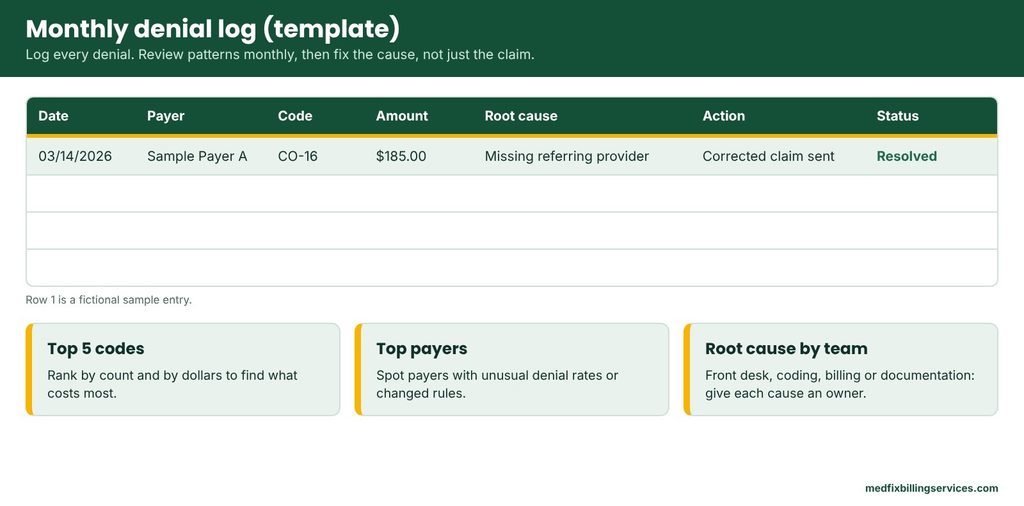
Each month, review these four things:
- Top five codes by count and by dollars.
- Payers with unusual denial rates or recent policy changes.
- Root cause by team: front desk, coding, billing or provider documentation.
- Whether the fix from last month actually reduced that code.
Give each root cause an owner and a due date. For the metrics to watch, see [LINK: denial management KPIs | /denial-management-kpis/].
Common Mistakes That Turn Small Denials Into Lost Revenue
- Resubmitting the same claim without changing anything.
- Missing the payer’s appeal deadline because it was never calendared.
- Fixing data on the remit or claim form instead of in the source system.
- Writing off a denial without checking for proof of timely filing or appeal rights.
- Treating every denial as a one-off instead of a pattern.
When to Get Help With Denials
If denials keep stacking up in A/R, an outside team can find the patterns, fix the root causes and work the appeals while your staff stays focused on patients. Learn how Medfix handles denial management, or request a free billing audit to see where your claims are leaking revenue.
Frequently Asked Questions
What does CO mean in a denial code?
CO stands for contractual obligation. A CO adjustment generally means the provider is responsible for the amount under the payer contract and cannot bill the patient for it. PR means patient responsibility. Always check the group code before sending a balance to a patient.
What is the difference between a CARC and a RARC?
A CARC (claim adjustment reason code) explains why a payment was adjusted or denied. A RARC (remittance advice remark code) is an optional second code that adds detail, such as which field was missing. They appear together on the remittance advice, and you should read both before deciding what to do.
Which denial codes are most common?
CO-16, CO-18, CO-29, CO-50 and CO-97 are among the codes billers see regularly, and CO-197 appears whenever a required authorization is missing. Frequency varies by specialty and payer, so your own denial log is the best guide to where to focus first.
Can I rebill a denied claim?
It depends on the code. Denials caused by missing or wrong information, such as CO-16, are usually corrected and resubmitted. Duplicates (CO-18) should not be resent while the original is pending. Medical necessity and authorization denials normally go through appeal. Follow the payer’s instructions.
How long do I have to appeal a denied claim?
Deadlines vary by payer and plan, and they are usually printed on the remittance advice or in the provider manual. Check the deadline the day the denial arrives and put it on the work queue, because a missed window can close the appeal for good.
Sources and references: official CARC and RARC code lists (X12 / Washington Publishing Company), CMS Medicare claims processing and appeals guidance, and each payer’s provider manual. This article is general education and does not replace payer-specific or legal advice.